Dashboard
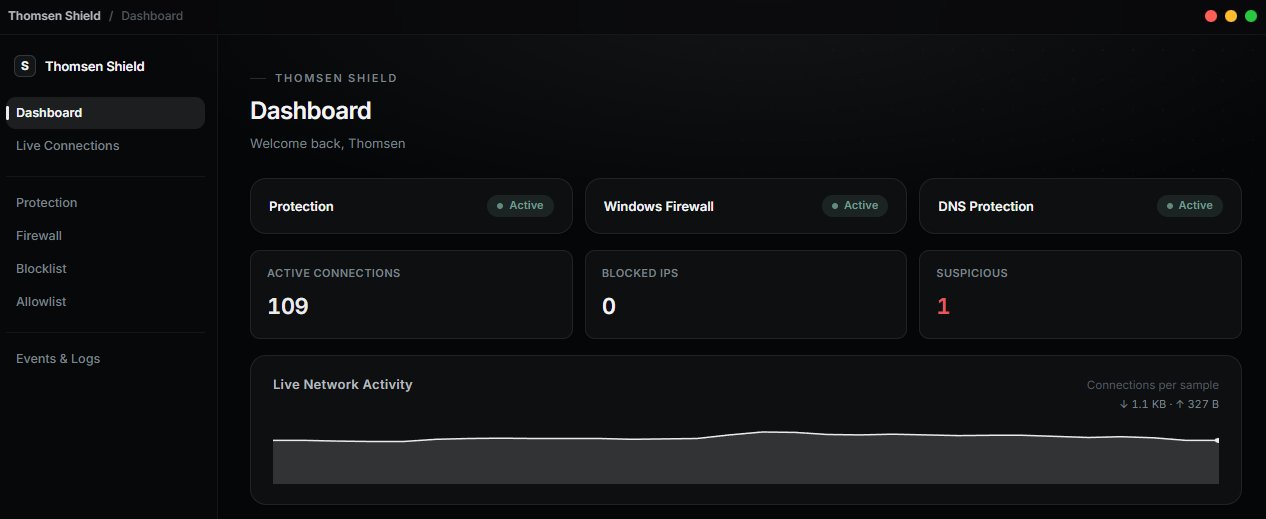
Protection, firewall, and connection status at a glance — active connections, blocked IPs, and a live activity graph, all updating in real time from the moment you launch.
Windows Network Protection
Real-time connection monitoring, automatic abuse blocking, and full Windows Firewall control — in one clean, lightweight app built for people who actually want to see what's happening on their network.
How it works
Thomsen Shield doesn't try to do everything. It watches your connections, flags what looks wrong, and gives you full control over Windows Firewall — nothing more, nothing hidden.
01
See every active connection on your PC — the app behind it, the remote address, and its status — updated live.
02
Connection spikes and repeated connections from one IP are flagged automatically, with a sensitivity level you control.
03
Block an IP or app in one click, or manage Windows Firewall rules directly — Thomsen Shield only ever touches rules it created.
Features
A full set of network and firewall tools in one deliberately minimal interface.
Protection, firewall, and connection status at a glance — active connections, blocked IPs, and a live activity graph, all updating in real time from the moment you launch.
Every active TCP/UDP connection, with its app, remote address, and status, updated live. Block, allow, or copy an IP straight from its details.
Flags connection spikes, repeated connections from one IP, and port-scanning, plus checks every connection against a live threat-intel feed — with Low / Normal / High sensitivity. Lockdown Mode raises that to High automatically when needed.
Blocks lookups for domains on a maintained malware and command-and-control list, so infected software can’t reach them. Your DNS settings are restored exactly when you turn it off.
View, create, enable, disable, and remove rules — all prefixed so Thomsen Shield only ever touches what it created. Built on Windows Firewall, not a replacement for it.
Every blocked IP with its reason and expiration. Trusted IPs and private ranges are protected automatically; add, remove, or make any block permanent yourself.
A filterable activity history, exportable to TXT or JSON. Blocks, rule changes, and detected spikes all land here, so nothing goes unrecorded.
Product
No subscriptions, no tiers to compare. Buy once, use it for as long as you own a Windows PC.
Thomsen OSINT
Lifetime license · Windows 10 / 11
Pre-orderThomsen Shield
Lifetime license · Windows 10 / 11
PurchaseCovered by our 14-day refund policy.
Thomsen VM
Free program · Windows 10 / 11
VM Download€30 one-time · Lifetime license · Windows 10 / 11
Free · Windows 10 / 11
€10 one-time · Windows 10 / 11 · Coming soon
A Discord bot for server protection and moderation.
FAQ
No. All Thomsen software is sold as a one-time purchase with no subscriptions or recurring charges. Thomsen Shield costs €30 for a lifetime license, while Thomsen OSINT costs €10 for a lifetime license.
Thomsen Shield monitors your PC's network activity, detects unusual connection spikes, and can automatically block abusive connections. It is designed as an additional defensive layer and does not claim to stop every DDoS attack.
Thomsen OSINT provides tools for username searches, domain intelligence, IP intelligence, metadata analysis, and other OSINT research from one application.
Both programs support Windows 10 and Windows 11, 64-bit.
Thomsen Shield only requests administrator rights when an action requires them, such as creating or removing Windows Firewall rules. Thomsen OSINT does not require administrator access.
Yes. You can turn on "Start with Windows" in Settings so Thomsen Shield is already monitoring as soon as you sign in.
Each license is intended for one Windows PC at a time. You can move your license to another PC when needed.
Both programs are designed to run locally wherever possible. Thomsen Shield does not upload your network activity or blocked IPs. Thomsen OSINT does not require a cloud account or telemetry. See the Privacy Policy for more information.
You can contact us within 14 days of purchase to request a refund according to our Refund Policy.